Showing posts with label informatics. Show all posts

Sunday, 19 February 2012

From the Shelf: The Longer Long Tail by Chris Anderson

I picked up this book randomly in Waterstones the other day, trying to use up the points on the gift card my work colleagues had thoughtfully bought me as a leaving present.  I remembered hearing about the 'Long Tail' on the LISF module, and figured it would be relevant reading.

The idea of the Long Tail isn't new, and is probably old hat to most readers.  This book is an updated version of Chris Anderson's 2006 original, but to be honest, I don't think there was much added between the two editions.  Most of the information was pertinent to pre-2006, and this edition happens to be 2009, so it's still a little out of date.  For instance - no mention of Twitter, Spotify, and other newer social media.  Not even last.fm, come to think of it.  The thing is, you don't really need to have those sites mentioned.  Anderson gives you all the detail, and you just run with it.  Really, you could read 'Twitter' for 'Facebook' and you'd still get the same idea.  The theory of the Long Tail would still hold true.

And really, that's the only beef I have with this book.  Much as I enjoyed it (and I tell you true, I did), most of it was repetition.  After the first couple of chapters, you'd pretty much got the point and were ready to move on.  There is a Long Tail for just about anything you can think of - music, movies, coffee, chocolate, beer, clothes, prams, cars, advertising.  After finishing this book, you will be wondering what ISN'T affected by the Long Tail and finding yourself hard-pressed to find anything.

The thing is, once you know it, it's obvious.  We all have niche interests.  There's nothing amazing about that.  It's just that, with the internet, we have been spoiled by the expansion of opportunities to indulge in those interests.  Perhaps for the first time in history, people have had wide access to niche markets open up before them at the click of a mouse.  In the past traditional 'bricks and mortar' stores have only concentrated on the hits and the bestsellers because they had no space for the rare and the obscure, and the hits were sure to sell and make a profit.  Simple math.  Anderson's point is that this paradigm is dying - because of the World Wide Web.  Now the niche market constitutes a growing proportion of a company's overall profits - and it's continuing to grow.  If you have enough buyers in any one niche market, you are still going to make a hell of a lot of money, even if only one unit is sold per annum.

(Incidentally, this is one of the things I enjoyed most about being in Japan, specifically Tokyo.  Stores there heavily cater to Long Tail markets.  Yellow Submarine serves the long tail of roleplay gaming; Mandarake serves the long tail of self-published fan comics; Book Off serves the long tail of second hand books, CDs, DVD's and videogames).

Some people have criticised Anderson for not getting the economics right in this book; I don't know much about economics, but I know enough from what being a Long Tail consumer myself informs me.  There is no way I could've bought VS System cards a year after they'd been discontinued without access to specialist online stores such as the 13th Floor.  Neither could I have found the hard-to-find beads and findings I was looking for unless I went to great expense to get them specially shipped - or bought them cheaply and conveniently at The Bead Shop.  A whole new world has opened up for me and my interests through the internet; as has a whole new market been born for many businesses out there in the 'real world'.

So yeah.  It's worth a read.  Even if only to get your brain ticking over all the Long Tails it can possibly conceive of.

Sunday, 4 December 2011

The World of Open

One thing I'm all for is the world of open on the web.  I can't be bothered with registering, subscribing and paying.  Surely the whole point of the net is to have everything at your fingertips?  Who wants to jump through all those hoops?

I'm a big fan of FileHippo.  Many of the programs I've downloaded are open source.  I'm not crazy about the whole open source movement (I take a practical approach rather than an ideological one), but I fully support anything to do with open source and open data.  With freedom of information, it makes it a whole lot more practical to make everything available online instead of spending hundreds of man hours working through request after request.  Not to mention the advantages of creating RDF schemas for such data and creating huge mashups of information.

On a personal level, open source comes a lot into my everyday life creating for the Sims.  There is a big divide in the community about being 'fileshare friendly', or choosing to withhold or charge for the content you have created.  This goes not only for custom items, skins and objects, but also for custom programs made to get the most out of the game.  It is a very contentious issue, and still divides the community after many years.  It seems that open source is something that people feel strongly about on both sides of the divide.

Sharing my creations freely is, for me, being part of an online community to get the best out of your game.  Also, the ability to push the boundaries with your creations and 'show off' what you can achieve is also a big motivation.  It is also a great way for creators and users to share their ideas and needs, to look outside the box and to create things from a whole new viewpoint.  Creators create in response to other player's needs as well as their own.  This makes the community atmosphere very productive, stimulating and open-minded.  And more often than not, people are passionate enough about a service to donate in order to cover costs, so it works both ways.

Friday, 25 November 2011

The journey into Web 3.0....

I'd always read of the semantic web as Web 2.0.  So it was a surprise to come across the concept of Web 3.0.  Actually, the term 'semantic web' has been bandied around for a long time.  What it actually is is up for debate.  The easiest way to think about it is in terms of Web 1.0 = read only, Web 2.0 = read/write, and Web3.0 = read/write/execute.

What I take from the concept of Web 3.0 is the idea of making machines smarter, more 'intuitive'.  Of course, since computers are inherently stupid, this involves us giving the means with which to become smarter and more intuitive.  Like giving them the semantics to work with, in order to retrieve data more effectively.  In short, data is not only machine readable, but machine understandable.

This is all technically theory, since the semantic web doesn't really exist - yet.  We still don't really have a system whereby computers can build programmes, websites, mashups, what have you, in an intelligent and 'intuitive' way according to our needs.  But the potential is there, with tools like XML and RDF.  These involve the creation of RDF triples, taxonomies, and ontologies.  What the hell, you may ask?  And I may well agree with you.  How I've come to understand it is that these are essentially metadata applied to information in order to relate those pieces of information together in a semantic way.  These relationships between data or pieces of information make it easier to retrieve them, because they are now given a context within a larger whole.

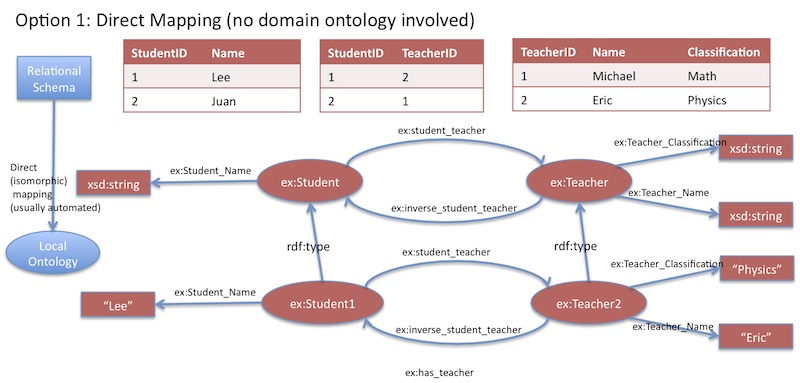
This does have its parallels with Web 1.0.  RDF Schemas (taxonomies expressed as groups of RDF triples) have a certain similarity to the concept of relational databases.  RDF schema 'nodes' can be equated to the primary key in relational databases.  In fact, the whole idea of RDF schemas can get a little confusing, so some of us found it easier to think of it in terms of a web-based relational database.

Relational database <-> RDF schema
The idea behind this is essentially to create relational databases on the net, but to link them semantically to one another, effectively creating the ability to find correlations between vast amounts of data that would otherwise be remote and essentially invisible.  The advantage is that we can get the accuracy of data retrieval results on the Web.  To take the diagram's example; we have a database of student's GCSE results.  If we pair this up with a demographic database, and apply an ontology to them (thereby creating rules of inference), we can discover correlations between GCSE results and student demographics.

The potential to make even more advanced and relevant mashups is the huge advantage of this technology.  However, the problem is that it requires quite a bit of skill and time investment in order to create these schemas, taxonomies and ontologies.  Most people would be satisfied with what they can create via Web 2.0 technologies - with social networking, blogging and mashups.  The potential to make faulty schemas is also a problem - as with a database, any error in organising the information, or in the data retrieval process will mean a complete inability to access data.

But the main problem I see is that these schemas are only really applicable to certain domains, such as librarianship, archiving, biomedics, statistics, and other similar fields.  For the regular web user, there are no particular benefits to applying an RDF schema to, say, your Facebook page - but it would probably be useful to Mark Zuckerberg.

The semantic web is probably more useful in the organisation of information on the web, and harnessing it.  But it would probably be largely invisible and irrelevant to the legions of casual web users out there.


Wednesday, 19 October 2011

Information Retrieval versus Data Retrieval

This week's exercises finally put last week's mind-mushing exercises into perspective.

The purpose was to draw a line between data retrieval (what we did last week) and information retrieval (what we did this week).  Data retrieval is the kind of thing we do when we query a database.  With information retrieval, the results are 'subjectively' relevant - I have a huge heap of documents, and I need to decide what are relevant to my needs or not.

I am a prolific user of Google.  I use it at least a dozen times a day, if not more.  It is easy to think from the perspective of a user.  There is something I want.  I type it in the search engine, and I hope I find what I'm looking for.  Sometimes, a lot of frustration ensues.

But why is this?  Why is it sometimes so difficult to find what you're looking for?

More often than not, the reason is because people don't index their 'documents' effectively.  They lose sight of what it's like to be a user themselves.

As the owner of a website (or two), this is pretty pertinent for me.  It is all too easy to speed through the creation of a website summary, keywords or tags.  Usually you just want to get the creation bit out of the way and get going.  But do those keywords fulfil user's needs?  For example, you run a football website.  'The best football site in the world', you may profess.  But what if an American fan is searching for a football site.  What if he uses the keyword 'soccer'?  Your site may very well be the best in the world, but you're immediately cutting off a large proportion of your potential audience simply by not giving enough thought to your indexing terms.

All sites have different indexing needs, and these should be made with the user in mind.  A Shakespeare website may want to index its documents by phrases.  For example, a user may be searching by a particular line or quote, e.g. "To be or not to be."  Therefore, indexing will have to be tailored to user's needs.

In the computer lab, our task was to query two search engines - Google and Bing.  Easy, I thought.  Perhaps too easy.  But of course, I was wrong.

We had to use different search models in order to get to different types of information.  And depending on the type of information we had to find, certain search models worked better.

For example -

  • Natural language queries.  I don't use these very often.  But they often turned up very useful results, particularly on informational, exploratory information (when that information was explicit.  Finding out about the Civil War levellers confused the search a bit, since 'levellers' could be any number of things).  
  • Quotation marks - I use these most often.  They're very useful for finding documents that contain certain words or short phrases.  When a natural language query failed, adding quotation marks and deleting stop words usually helped narrow the search.
  • Boolean operators.  Something I NEVER use.  I'd always thought of them as kind of antiquated and redundant.  So they proved to be - sometimes.  I discovered that they simply do not work with Google.  However, they were compatible with Bing (Bing automatically uses the AND operator anyway).  An example - searching for Jerusalem artichokes and how to cook them.  For some reason, the search turned up quite a bit on growing Jerusalem artichokes.  Finally I found a use for the NOT operator.  With Google, this simply turned up more hits on growing artichokes.  With Bing, it seemed to work as intended.
Another part of the exercise was to calculate the precision of each search engine's results.  What did I discover?

Why, that Google has a higher precision rate than Bing.  Of course. ;)

Addicted to Google and the "Church of Search".

Wednesday, 12 October 2011

What colour do you want that database?

Like many people, if someone said 'database' to me, I'd immediately think of a spreadsheet.  So when I knew we were learning databases this week, I was a little freaked out since frankly I hadn't done spreadsheets since I was in secondary school.

Needless to say, as with most things on this course, my preconceptions were totally wrong.

Like the internet, databases have a longer history than I'd thought.  But of course, back in the day there was a lot of duplication, inconsistency and redundancy of data.  Nowadays we tend to store data centrally, in order to mitigate these problems and aid the fast retrieval of data.

As an introduction to databases, we learned the basics - querying them using SQL.  In the lecture, it all seemed fairly easy, logical and generally straightforward.  I have to admit, I haven't got the most logical of minds, but once you get something, you should be able to follow the logic to its natural conclusion, right?

Heh heh.  Sitting in the computer lab after the lecture, my mind hit a complete blank.  What did I just learn?  How does it work again?  Like maths, it's like breaking a code - once you know the formula, it's easy to unravel the answers.  And I found I hadn't quite got a handle on that formula.  A proliferation of bad and incorrect commands followed.  And even more than that, a whole lot of simple, straight guessing.  Sometimes I would guess and guess until I gave up.  When I finally asked for help, I realised that there are just some commands you need to know; and that once you know them, you have the key.  A whole lot of doors unlocked.  Every time I learned a new 'key', it made it easier to guess what the answers to some of the exercises might be.

Still, it took me an evening of querying the Database Management System at home before I managed to complete all the exercises.  I recorded each answer, because I knew that if I didn't, I would forget them.  The best analogy I can come up with is SQL is like learning a language.  You will never learn to speak it fluently unless you use it, and if you don't practice you will get rusty.  So I am now spending my time making random queries of the database, trying to get it all to stick firmly in my head.

And I guess it will - after a million or so queries of practice. ;)

Yup.  Exactly what I would've said a few days ago...

Monday, 10 October 2011

Monday, 3 October 2011

DITA von Tease

What is the internet?

Yes, I am one of those people who would have answered - it's the World Wide Web.  And if someone had asked me, "What's the World Wide Web?", I would have answered - "Duh!  It's the internet!"

Today I learned that the internet and the WWW are not the same thing.

Really, it's one of those things you've heard about and know at the back of your head, but if you were to describe the difference between the two, you wouldn't have a hope in hell of explaining it.  Well, I wouldn't anyway.

Richard had a very good way of explaining it:-

"The internet is the road, and the World Wide Web is the car that drives the road."

In other words, the net is the infrastructure, and the World Wide Web is a service that allows you to 'navigate' the net.  There are other services that allow you to traverse the net in different ways to the World Wide Web.

The Information Super Highway.  There really is a reason for that vehicular analogy!

The 'net' began in the 1960's, and was developed by the military in order to make sure that even when one computer with information went down (or was destroyed by a nuclear warhead, as the case may be), that information would still be stored and shareable amongst other computers in the network.

Back in those days, computer servers were huge, clunky things that probably needed a whole department to run them.

The days when the Information Super Highway was more like the
Information Super Monolith.

Nowadays, the gap between client and server computers is narrowing.  Client computers are now becoming more and more powerful, and the traditional distinctions between the two are blurring.  In a way, we are all becoming servers.  I'm not sure exactly how it works, but torrenting and peer exchange seem to be proof of that closing gap.

Anyway, in the computer lab we got to make our first web page, after learning the basics of HTML.  We kind of take it for granted nowadays that someone else will make our webpage for us.  Many sites have web templates, or we can use a program like Dreamweaver to create one like we would create a document on Word.  The last time I actually wrote HTML was in 1997.  But even then I was no whizz-kid at it.  I certainly didn't really get it.  So what did I learn today?

  • Tags like <b> and <i> are now 'old-fashioned'.  Semantic tags like <em> and <strong> are now the way to go, because they're more 'global-friendly'.
  • I finally know what CSS stands for!  I finally know what CSS is!  WOOT! XD
  • LAN = Local Area Network; WAN = Wide Area Network; Internet = a vast network of all these networks.  TA DA!!!
See, it's really all very simple; I think that these computer scientists really just like to tease the hell out of us with their crazy acronyms... ;)

Monday, 26 September 2011

Information/Library Sciency...Stuffs?

Well, as they say, "You learn something new every day", and today, on my first day of the MA/MSc Library Science course, I learned some really random stuff that everyone should know but most people don't.  Like a byte is made up of 8 bits, and so therefore a kilobyte is 1024 bytes, and a megabyte is 1024 kilobytes and so on.

To everyone who knows all this already, and who are sniggering behind their sleeves at me... Yeah.  I admit it.  I was one of those dumb people who actually believed that a kilobyte is 1000 bytes.  But hey, what is my first Library Science class for, if not to learn the BASICS of the BASICS.  You'd think that since I spend half my life online, I'd know all this stuff already.  But I realised, sometimes you get so immersed in something, and it becomes so much a part of your life, that you don't really stop to think about the ins and outs and how things work.  It's a bit like language.  How often do you think about grammar, or the letters that make up the words you say and why they're arranged that way?  So today, I really learned for the first time about the 'letters' of digital information - bits and bytes, and files and formats.

Random stuff (for me) to keep a note of:-

  • Formats can be interoperable, but most often are not.
  • What's the difference between files and documents?  Files = named collections of related digital information.  Documents = a build up of information using different files, e.g. a blog entry incorporating text, images, videos etc.

The easier part of the Digital Information Technology & Architectures class was actually making a web page with all the links and the images and such.  I'm much more comfortable with the doing than I am with the theory (except when Blogger decides it hates me :p).

Next up - Library & Information Science Foundation... Well, that's a pretty nebulous title.  I didn't quite know what to expect.  The last thing I was expecting was history - one of my fave hobbies!  Lyn gave an awesome and informative lecture on the history of information, documents and writing.  We kind of take it for granted that we live in a proverbial sea of information, something that surrounds us and is just 'there'.  But where did it all begin, and when did it start be organised?  And how?  From cave paintings to scrolls, from the telegraph to the World Wide Web, the creation of information is a journey that is still going on, expanding, developing  exponentially... And the big question is, how do we organise this proliferation of information?  And that's where Library Science comes in.  Fascinating stuff.

Which got me to thinking... history + libraries = the Library of Alexandria.  A storehouse of ancient knowledge lost when it burned down somewhere between 48 BCE and 642 CE.

ONLY A RECONSTRUCTION.  NOT THE REAL LIBRARY OF ALEXANDRIA.
Think about all the priceless information we lost along with the library.  Think of the glee of all those librarians had they ever had the chance to transcribe, archive and digitise all those documents.  Sadly, they're all (mostly) gone - and therefore probably one less thing for us to worry about. :p